There are two options to adjust your child’s level. You can either adjust this manually, or your child can complete a placement test to determine the best level for them to enter the program.
For both options, please follow these steps:
1. Log in to your Family Dashboard
Log in to your Family Dashboard: https://app.readingeggs.com/parent/dashboard
If your login automatically takes you to your child’s account, you will need to log out until you reach the Family Dashboard.
2. Select your child
From the login screen, select the child whose progress you would like to adjust.
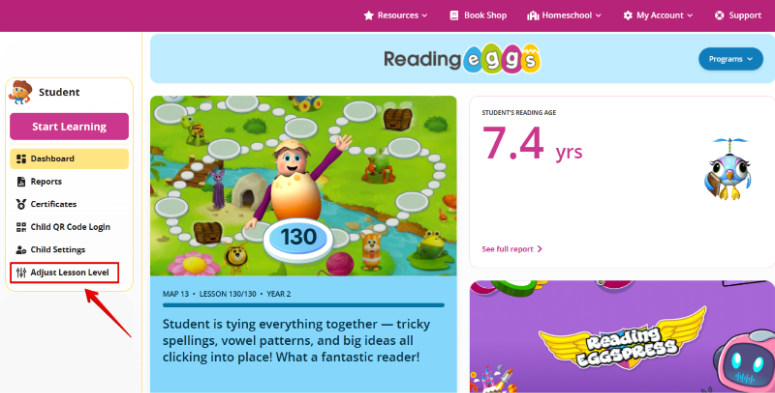
3. Select Adjust Lesson Level
Click the ‘Adjust Lesson Level’ option located on the left side under the student’s profile menu.
4. Choose your adjustment option
On the next screen, make sure the correct program is selected. This will be the program you are adjusting.
The first option allows you to manually adjust the lesson level to your preference.
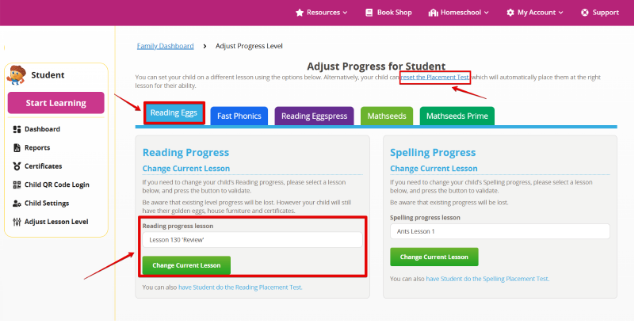
Alternatively, you can select the ‘Reset placement test’ option. This will load the placement test the next time the student accesses the main lessons for the selected program.
Things to note
- Your changes will be reflected the next time you enter the program.
- When you reset the placement test, your child’s level progress will be removed. However, all golden eggs, critters, house furniture and certificates will remain.
- If you’re using a school-linked account, your child’s levels are set by their teacher. You will need to contact your child’s teacher to make level adjustments or reset the placement test.
Was this article helpful?
That’s Great!
Thank you for your feedback
Sorry! We couldn't be helpful
Thank you for your feedback
Feedback sent
We appreciate your effort and will try to fix the article